How to add an early-bird discount to a registration
Set early-bird discounts so a registration’s price changes automatically on your chosen dates. Families see the active discount and the updated checkout total, including the installment schedule when offered.

Set early-bird discounts so a registration’s price changes automatically on your chosen dates. Families see the active discount and the updated checkout total, including the installment schedule when offered.
Add the discount schedule
Start creating the registration in the admin dashboard.
Open Pricing and set the registration’s standard price or pricing options.
Enable Early Bird Discounts.
Set the cutoff date and dollar amount for the first discount: Sign up before [date] to get [$ amount] off.
Select Add discount if you need another tier.
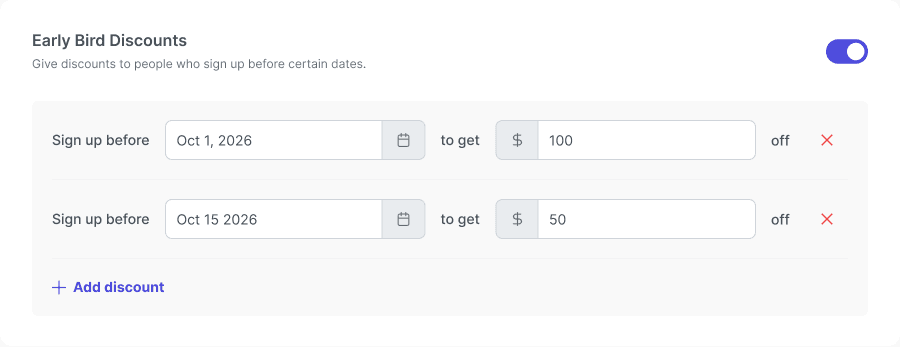
Early Bird Discounts enabled with two cutoff dates and dollar discounts. Dates and amounts are examples.
Check the dates and amounts
Use dates that are not in the past.
Make later discount amounts smaller than earlier ones.
Keep every discount within the registration price and resolve any validation messages.
Review the schedule before finishing registration setup.
Check the family view
Open the registration in the portal.
Check the active discount and total for the selected pricing option.
If installments are offered, check the updated payment schedule too.
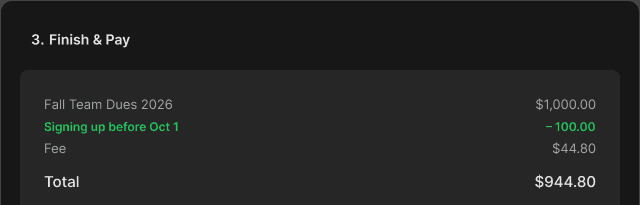
Checkout example showing the early-bird deduction, fee, and final total.
Tip: Use clear dates in your program description and customer messages so families know which deadline applies. If you are unsure about a cutoff time, confirm it before advertising a last-minute deadline.