How to pay an overdue balance in the portal
You can pay a past-due balance from the Billing page in your club’s portal. Choose a saved payment method or add a new one, then review and confirm the payment.

You can pay a past-due balance from the Billing page in your club’s portal. Choose a saved payment method or add a new one, then review and confirm the payment.
Open your Billing page
Open your club’s portal and sign in.
Select your profile image or initials in the top-right corner.
Select Billing from the account menu.
Pay the overdue balance
Find the registration or plan under Needs attention.
Check the program name and overdue amount.
Select Pay Overdue Balance.
Choose a saved payment method or add a new one.
Review the amount and confirm the payment.

An example overdue item under Needs Attention, with its payment action.
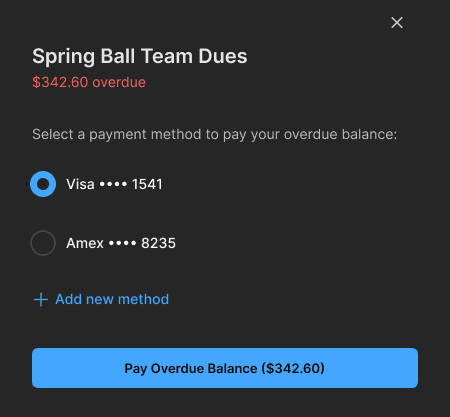
Choose a payment method and review the overdue amount before paying.
If you don’t see the balance
Check that you’re in the correct club’s portal.
Check the email address shown in your account menu against the account used for the registration.
Contact your club if the balance still looks incorrect or you need help finding the right account.
Note: These steps are for the web portal. You can open the portal in a browser on your computer or phone.