How to book a lesson in your club’s portal
Book a lesson in your club’s portal by choosing the service, instructor, participant, and time. Apply eligible credits and review the total before paying.

Book a private lesson through your club’s portal in The Futures App. Choose the service, instructor, and available time, then review the participant, credits, and final total.
Before you start
Sign in to the account you use for the participant. Your club must offer the lesson and have an available instructor and time.
How do you book a lesson on the web?
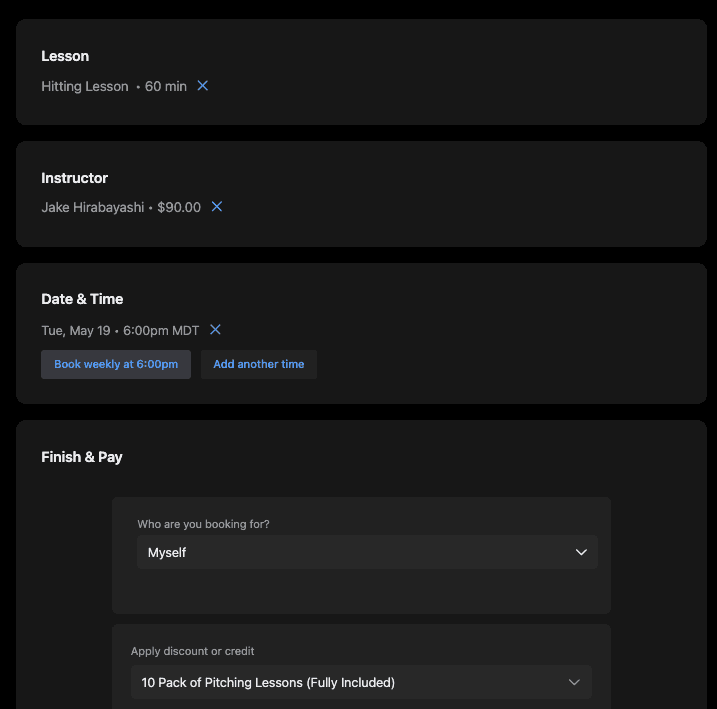
Open your club’s portal.
Open the lesson or service-booking section.
Choose the lesson you want.
Select the available duration.
Choose an instructor.
Select an available date and time.
Continue to Finish & Pay.
Select the participant you are booking for.
Open Apply discount or credit if you have an eligible benefit.
Select the benefit you want to use.
Review the updated total and any fees.
Choose the requested payment method if a balance remains.
Complete the booking using the confirmation or payment control shown.
Check the booking confirmation.
Available durations, rates, instructors, and times depend on the service. Check the displayed time zone before confirming.
How do you manage a lesson on mobile?
Open Schedule in the app.
Select the lesson you want to review.
Check the participant, instructor, location, date, and time.
For an upcoming lesson you need to cancel on iPhone, follow How to cancel a booking in the iPhone app. Contact your club if you need to change the lesson and the required action is not available.
Platforms: The booking steps above cover the web portal. The linked cancellation guide covers iOS. Mobile screens and available actions may differ.
Common questions
Can you use package credits or membership discounts?
Yes, if a benefit is eligible for this participant and service. Select it in Apply discount or credit and check the updated total. If the total is not what you expected, ask your club before completing payment.
Can you book the same time each week?
Where the service offers Book weekly at [time], select it to request that recurring slot. Add another time lets you add individual slots where offered. Review all dates before checkout.
Does canceling guarantee a refund or restored credit?
No. Review the cancellation information shown for your booking and ask your club about its policy. Do not assume a cancellation automatically refunds money or restores a benefit.