How to register for a team, camp, or program
The Registrations section is where you sign up for your club's teams, camps, tryouts, tournaments, and other programs. Some registrations have a fixed price; others offer installment payment plans.

The Registrations section is where you sign up for your club's teams, camps, tryouts, tournaments, and other programs. Some registrations have a fixed price; others offer installment payment plans.
How to register
Log in to the portal using the icon in the top-right corner
Select Registrations from the left-hand menu or the home screen
Browse the list of available registrations — each card shows the name, dates (if applicable), and price
Click the registration you want to join
Review the details, choose a payment option if installments are available, and complete checkout
Types of registrations you may see
Camps: e.g. Summer Camp — flat fee or installments
Tryouts: e.g. 12U Tryouts — typically a one-time fee with set dates
Team dues: e.g. High School Team Dues — often a large amount paid via installments
Tournaments: e.g. Perfect Game Tournament — single registration fee
Understanding installment plans

Some registrations — especially team dues and multi-week camps — show a price listed as "$X.XX or installments." This means you can spread the total cost across multiple payments instead of paying all at once. You'll see the available plan options at checkout.
Once enrolled in an installment plan, you can view your remaining balance and upcoming payments anytime from your Billing page.
Filtering registrations
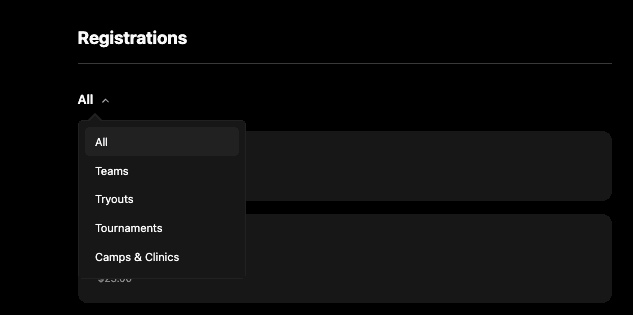
Use the All dropdown at the top of the Registrations page to filter by category, making it easier to find what you're looking for when your club offers many programs.
Additional Resources:
Managing you billing and payment methods
How to navigate the port (as a parent)
Booking a lesson (Portal & Mobile)
Resources By Role: