Understanding Benefits
Benefits are discounts or credits attached to your memberships and registrations that customers can redeem when booking lessons, classes, or rentals. They're the primary tool in TFA for bundling services, increasing retention, and front-loading cash onto your balance sheet.

Understanding and configuring benefits
Benefits are discounts or credits attached to your memberships and registrations that customers can redeem when booking lessons, classes, or rentals. They're the primary tool in TFA for bundling services, increasing retention, and front-loading cash onto your balance sheet.
What are benefits?
When a customer purchases a membership or pays in full for a registration, any benefits you've configured become available to them at checkout. Instead of paying full price for a lesson or class, the benefit applies a discount — anywhere from 5% off to fully covered (100% off).
The strategic play: Benefits let you sell a membership or registration upfront and bundle future service bookings into the value. The customer pays now; the credits are redeemed over time. This accelerates cash collection while driving consistent utilization of your facility and instructors.
Where benefits can be added
Memberships
Add recurring or unlimited benefits that refresh each billing cycle. Great for monthly training memberships that include a set number of lessons per month.
Registrations (paid in full)
Add a fixed credit pool tied to the registration. Commonly used for lesson packages — e.g. a "10 Pack of Pitching Lessons" bundled into a team registration.
How to add a benefit
Open the membership or registration you want to configure
Navigate to the Benefits tab
Click + Add Benefit — a side panel will appear
Configure the benefit fields:
Click Done to save the benefit
Limit types
Limit Type | Function |
|---|---|
Unlimited | No cap on usage. The customer can apply this benefit to as many qualifying bookings as they want for the duration of the membership. |
Recurring | A fixed number of uses that resets with each successful billing cycle. Mirrors the membership cadence — e.g. 4 lessons per month on a monthly membership. |
Fixed Limit | A set total number of uses for the entire membership or registration duration. Does not renew. Most commonly used for lesson packs on registrations. |
Example — Fixed Limit on a registration: A "10 Pack of Pitching Lessons" registration is set up with a Fixed Limit benefit: 100% discount on Hitting Lessons, quantity 10. When Jake enrolls, he has 10 fully-covered lesson bookings available. The Benefits tab shows 4 / 10 used and an expiration date. Each booking shows as $0.00 paid in the Payments Log with the source linked to the pack.
Manually assigning benefits
You can assign benefits directly to a customer outside of a membership or registration purchase in two ways:
Option 1 — At the user level
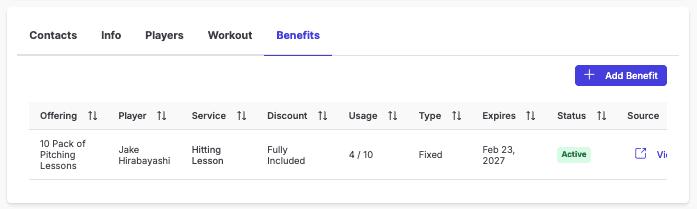
Go to Users and search for the customer
Click into their profile and select the Benefits tab
You'll see all existing benefits, usage counts, expiration dates, and a link to the source offering
Click + Add Benefit — the same configuration panel appears (Services, Discount, Limit Type, Quantity)
Option 2 — Adding to a package registration with waived payment
Open the registration (package) you want to add the customer to
Add the customer to the registration and select the option to waive payment
The customer receives the associated benefits without being charged
Manual benefit assignment is useful for comp situations, staff perks, or correcting benefit issues without requiring a customer to re-purchase.
Frequently asked questions
Can I see when a customer pays with a benefit?
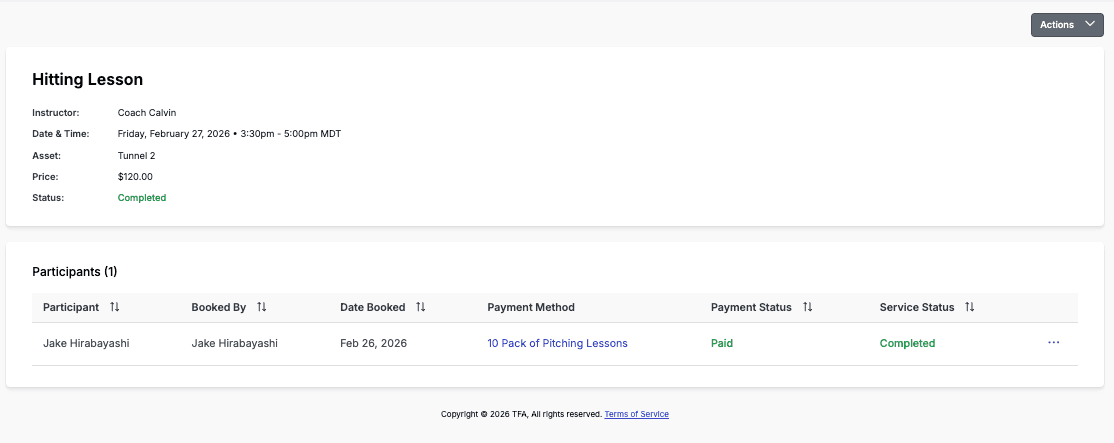
Yes. In the Payments Log, benefit-redeemed bookings show as $0.00 in the amount column. Click into the transaction to see the full detail — instructor, service, date, and the benefit source (e.g. "10 Pack of Pitching Lessons"). On the customer's Benefits tab, usage is tracked as a running count (e.g. 4 / 10).
Can I refund a benefit?
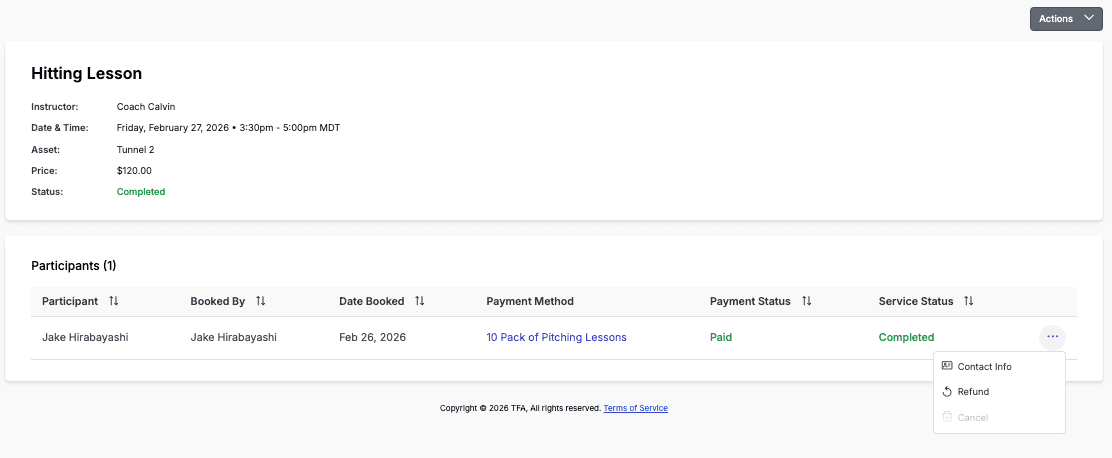
Yes — you can issue a refund on a benefit-redeemed booking, which returns the credit to the customer's benefit balance. Alternatively, you can simply add net new benefits to the user's account directly from their Benefits tab without going through the refund flow.
What services can benefits be applied to?
Benefits can be applied to Lessons, Classes, and Rentals. You can configure a benefit to apply to one specific service or multiple at once. Services must be created under the Bookings tab before they appear as options.
Additional Resources:
Setting up your first Registration
Understanding The Payments Log
Resources By Role: