Release: Booked Sessions View

See Every Booking — and What It's Worth — in One View
How much did this instructor's sessions bring in last month? Which services are actually driving revenue? How many people did you serve out of that one cage? Until now, answering questions like that meant exporting raw data and wrestling with a spreadsheet.
The new Booked Sessions view gives you those answers in seconds — a single place to see every booking you've taken, what it earned, and who it served.
Every booking, searchable and filterable
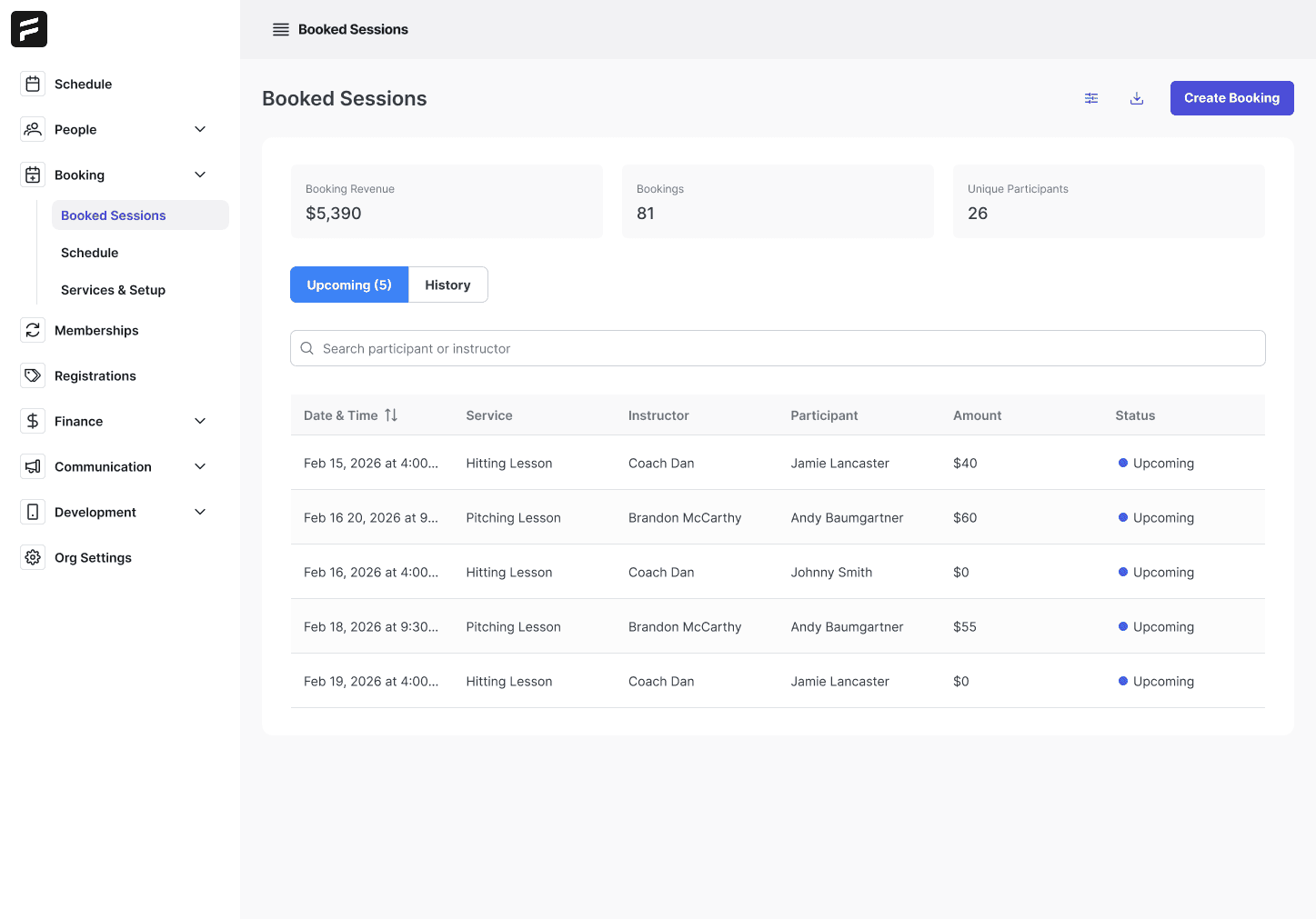
Booked Sessions is one searchable, filterable list of all your bookings — both Upcoming and History — so you're never digging through separate screens to reconstruct what happened.
See the details that matter at a glance:
Date and time of the session
Service that was booked
Instructor who delivered it
Participant who attended
Amount collected
Status of the booking
Search and filter down to exactly the slice you care about, and the list shows only what you asked for.
Live summary cards that move with your filters
Three summary cards sit at the top of the view: Booking Revenue, Bookings, and Unique Participants.
They aren't static. They recalculate based on whatever filters you've applied. Filter to one instructor, one service, or one date range, and the totals instantly reflect exactly that slice. It's a real-time answer to "how much, how many, and how many people?" for any corner of your operation.
Export to CSV for payouts and reporting
Any filtered view exports straight to CSV. That gives you clean, shareable numbers for instructor payouts, revenue reporting, and whatever else your books need — without rebuilding the data by hand.
What you can actually do with this
This is where Booked Sessions earns its keep. A few ways operators are already putting it to work:
Report on a specific service. Filter to one offering and see exactly what it booked and earned — so you know which services are worth promoting and which aren't pulling their weight.
Report on a specific instructor. See every session a coach delivered and what it generated. That's the data you need to calculate commissions or payout amounts. (TFA doesn't cut instructor payments directly yet — but this gives you the exact numbers to run them.)
Report on a specific facility asset. Filter by a cage, field, or building to see utilization and revenue per asset, so you can spot your most — and least — productive space.
How to access this
Booked Sessions is live now for organizations using TFA's booking and payments tools — no update needed. Find it in your booking dashboard.
Not set up for bookings and payments yet? Contact us or reach out to your rep to get started.
Past News & Releases
LeagueApps vs. Platforms With Player Development: A Real Comparison
How to Manage a Travel Baseball Club Without Five Different Apps
Youth Sports Registration Software: What Clubs Actually Need
Sports Scheduling Software: What to Look For (and What to Avoid)
How Smart Scheduling Software Fills Your Facility's Dead Hours
Online Booking for Sports Facilities: How to Stop Losing Revenue
The Hidden Cost of Running Your Sports Organization on Five Different Apps
Release: Portal Login, Waive Payment, Pay with Stored Method
The Futures App is the all-in-one platform built for youth and travel sports organizations. We help coaches, club directors, facility owners, and independent trainers run their entire operation from a single app — so they can spend less time on administration and more time developing players.
The platform combines everything a modern sports organization needs: player development tools for tracking video, metrics, and drills; facility and booking management with real-time availability; payments and registration for memberships, teams, camps, and bulk invoicing; team communication through structured channels and direct messaging; and professional website hosting built for sports organizations.
The Futures App is used by clubs, academies, and training facilities across baseball, softball, basketball, soccer, volleyball, lacrosse, football, and more. Whether you're running a 200-family travel club or a single-sport training facility, the platform is designed to grow with your organization.
If you're ready to stop duct-taping tools together and run your organization the way it deserves to be run, book a demo and see The Futures App in action.