Release: Schedule Now Runs Your Whole Calendar

By Jake Hirabayashi, Founder & CEO

One Calendar for Everything Your Facility Does
A few weeks ago we gave your bookings a home in the Schedule tab. This release is the big one we were building toward: Schedule now runs your entire calendar — not just bookings, but games, practices, and any event your organization runs — and it does something no general calendar tool can.
Events are here
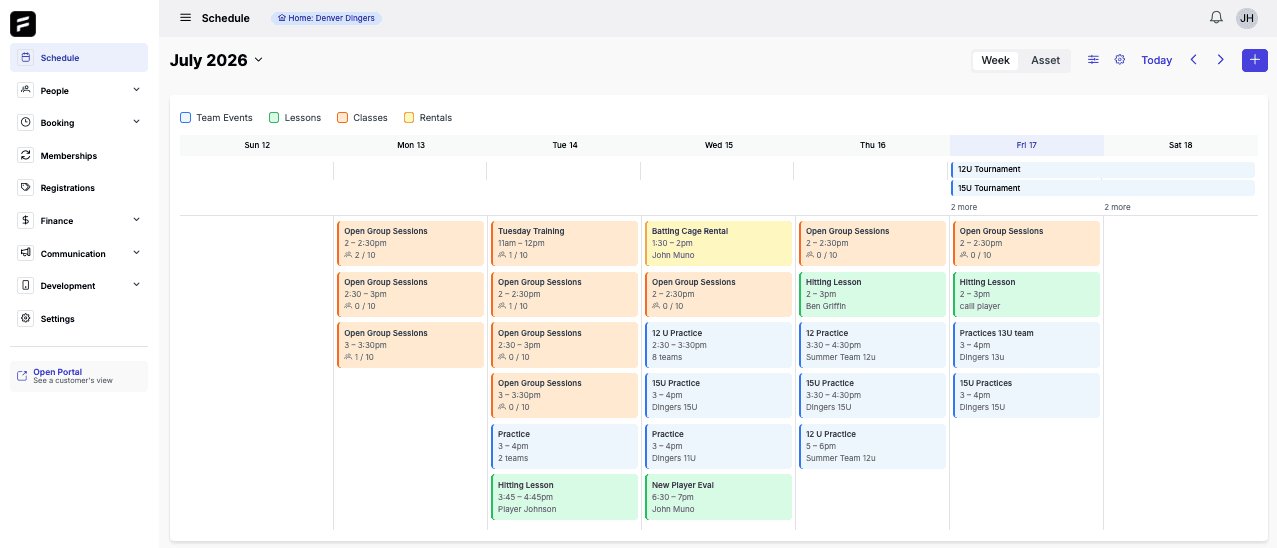
Schedule now supports Events — games, practices, meetings, tryouts, team socials, really anything. Your whole operation lives on one calendar instead of scattered across bookings in one place and events in another.
Everything, color-coded
The calendar is now color-coordinated across every type of thing you run, so you can read your day or week at a glance:
Lessons
Classes
Rentals
Events
One look tells you what’s happening and what kind of thing it is — no clicking into each entry. All day / multi day events are at the top of the calendar.
Recurring events and team & individual assignments
Recurring events — set up a weekly practice or a standing game once and let it repeat, instead of rebuilding it every week.
Team & individual assignments — assign an event to a whole team or to specific individuals, so the right people know it’s on their calendar.
Sync with Apple, Google, and Outlook
Schedule now supports external calendar syncing. Your events flow into Apple Calendar, Google Calendar, and Outlook, so coaches, staff, and families see what’s happening in the calendar they already check every day.
On mobile and in admin
The full Schedule experience is available both on mobile and in Admin, so whether you’re at a desk or on the field, you’re working from the same up-to-date calendar.
The big one: events that block your facility and assign your instructors
Here’s what a general calendar app simply can’t do. Because The Futures App is a vertical system that includes facility management, an event isn’t just a note on a calendar — it’s connected to your actual operation.
When you create an event, you can block off facility assets (a cage, a field, a court) and assign instructors in the same action. That means the event automatically reserves the space and the coach’s time — so you’re not creating duplicate events just to block availability correctly.
In most tools, putting a practice on the calendar and making sure the field and coach show as unavailable are two (or three) separate jobs, and they drift out of sync the moment something changes. Here it’s one event, one source of truth: schedule it, and your facility and staff availability update with it. That’s the payoff of scheduling and facility management living in the same system instead of bolted together.
How to access this
Everything above is live now in your TFA Schedule tab — in Admin, no update needed.
For mobile sync, update to the latest mobile version on Google Play and App Store.
Not on TFA yet, or want to see it? Contact us or reach out to your rep.
Jake Hirabayashi
Founder & CEO, The Futures App
Jake founded The Futures App to give youth and travel sports organizations one platform for registration, payments, scheduling, and player development. He works directly with club directors, facility owners, and coaches across baseball, softball, and other youth sports.
Related Reading
Release: Make a Flyer and QR Code for Any Registration or Membership
Release: Sign-ups and Payments Tabs on User Details
Release: Families Can See Their Bookings in Portal
Release: Free Options on Option-Based Registrations
Release: A New Teams Workspace in Admin
Release: Charge Now on Invoices, Plus ACH When Adding Participants