Booking a lesson (Portal & Mobile)
Lessons are private, one-on-one sessions with an instructor. You can book directly through your club's portal on the web or through the mobile app. Available discounts and package credits are applied at checkout.
Lessons are private, one-on-one sessions with an instructor. You can book directly through your club's portal on the web or through the mobile app. Available discounts and package credits are applied at checkout.
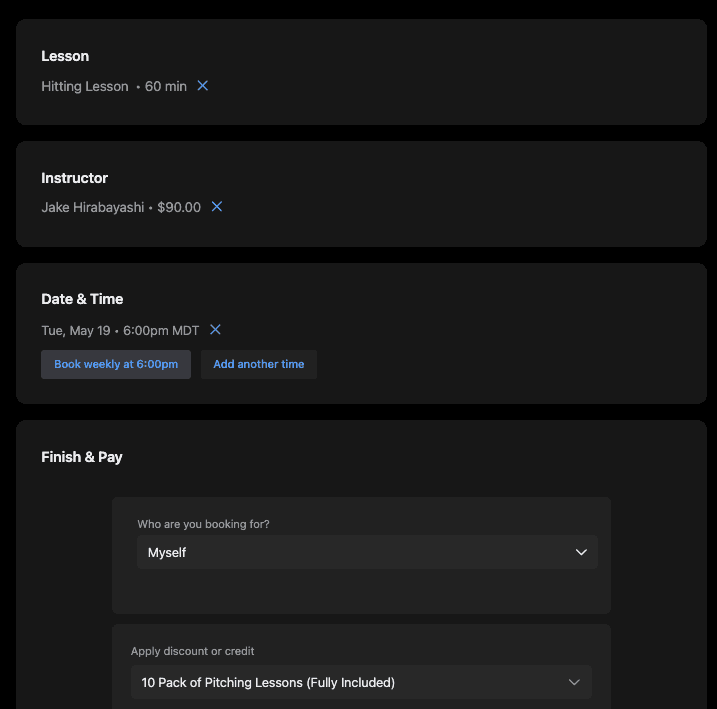
Booking via the portal (web)
Select your lesson type — from the portal home screen, click Lessons. You'll see the available lesson types, each showing the name, price, and session length options (e.g. 30 min, 60 min, 90 min). Click the duration button on the lesson you want.
Choose an instructor — browse the available coaches, each listed with a short bio and rate. Click Select next to the instructor you'd like to work with. Tap See more on any card to read their full bio.
Pick a date and time — a weekly calendar will show available slots. Times are displayed in your local timezone. Click any highlighted time slot to select it.
Finish & Pay — review your order summary and complete the booking.
Booking via the mobile app
Open the app and go to Schedule
Tap the + button
Tap Book a Service
Select your lesson type — same options as the portal
Choose an instructor
Pick a date and time — same weekly calendar view with recurring and multi-slot options available after selecting a time
Finish & Pay — same checkout flow as the portal, including the option to apply package credits or membership discounts
Using credits or discounts at checkout
If you've purchased a package (e.g. a 10-pack of lessons) or have a membership that includes lesson credits, you can apply them at the Finish & Pay step. Here's how the pricing looks with and without credits:
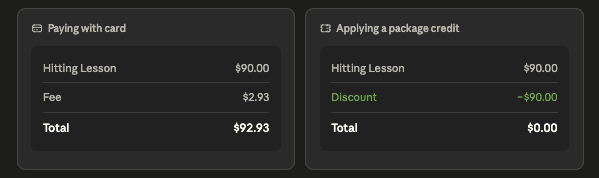
When a package credit fully covers the lesson cost, no payment method is required — just tap Complete booking to confirm.
A small processing fee may appear at checkout when paying by card. This fee is not charged when credits fully cover the booking.
Additional Resources:
Managing you billing and payment methods
How to navigate the port (as a parent)
How to register for a team, camp or program
Resources By Role: