Managing your billing and payment methods
Your Billing page is your central hub for viewing overdue balances, tracking active installment plans, and managing the payment methods on your account. You can access it anytime after logging in.

Your Billing page is your central hub for viewing overdue balances, tracking active installment plans, and managing the payment methods on your account. You can access it anytime after logging in.
How to access Billing
Log in to the portal — your initials will appear as an icon in the top-right corner
Click that icon to open the account menu
Select "Billing" from the dropdown
What you'll find on the Billing page
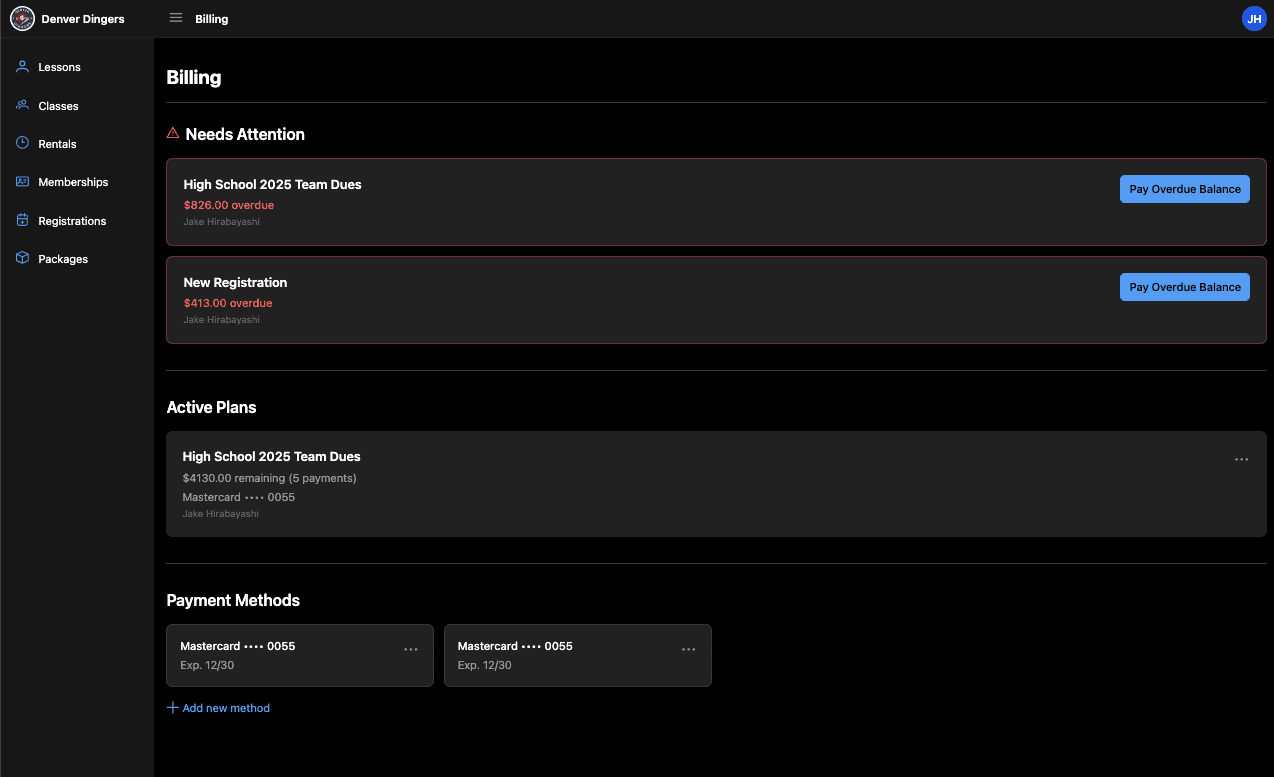
Needs attention (Overdue): Any registrations or plans with a past-due balance will appear here, highlighted in red. Each card shows the program name, amount overdue, and a Pay Overdue Balance button so you can clear it immediately using a saved payment method or a new one.
Active Plans: Installment plans you're currently enrolled in show here. You'll see the remaining balance, number of payments left, and the card being charged. Use the menu (⋯) on any plan to update the payment method assigned to it.
Payment Methods: All cards (or bank accounts) saved to your account are listed here. You can add a new payment method using the + Add new method link, or manage existing cards using the (⋯) menu on each card.
Paying an overdue balance
Go to Billing via the top-right account menu
Locate the item under Needs Attention
Click Pay Overdue Balance
Select an existing payment method or add a new one
Confirm the payment
Overdue balances may affect your ability to register for new programs. Pay promptly to keep your account in good standing.
Updating a payment method on an active plan
Go to Billing and find the plan underActive Plans
Click the⋯menu on the plan card
Select the option to update the payment method
Choose an existing card on file or add a new one
Adding a new payment method
Scroll to Payment Methods at the bottom of the Billing page
Click + Add new method
Enter your card details and save
Saved payment methods can be used for both overdue balances and future installment payments — you don't need to re-enter your card each time.
Additional Resources:
How to navigate the port (as a parent)
Booking a lesson (Portal & Mobile)
How to register for a team, camp or program
Resources By Role: